















🔥 Get our lowest price on the MacBook Pro 16-inch. | Shop Now

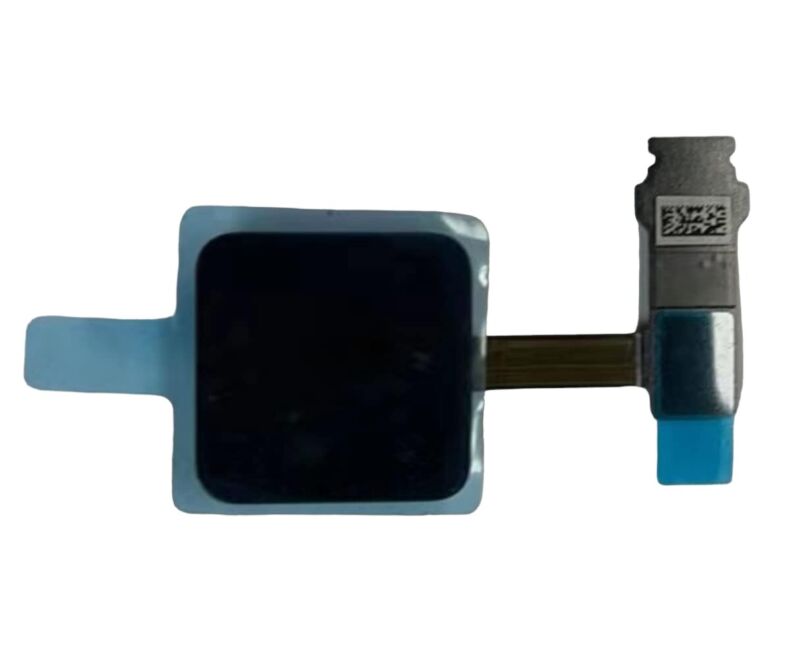
A2141 Power Button for 2018-2019 Apple MacBook Pro Touch Bar 16″

$45.01

The A2141 Power Button is designed for the 2018-2019 MacBook Pro 16″ with a Touch Bar. It serves as the main power control for the device. This button also integrates Touch ID functionality for added security.
SKU: 42e2b496-c101-4961-a43e-6736eca59583
Brand:
Primary Category: 2019 MacBook Pro A2141

Shipping: 5 - 9 days

1 in stock

TEKDEP Guaranteed Safe Checkout

Free USA Shipping & Worldwide Delivery

Online Exclusive: This product ships directly to your address. In-store pickup at our repair facilities is not available.

Product Specifications

General

SKU
42e2b496-c101-4961-a43e-6736eca59583
Brand
TEKDEP
Year
2018, 2019

Additional Details

Compatibility
MacBook Pro 16" A2141 2018-2019
Whats in the box
Touch Bar Power On/Off Button Touch ID

Description

A2141 Power Button for 2018-2019 Apple MacBook Pro Touch Bar 16″


CONDITION:

New


ABOUT:

The A2141 Power Button is an essential part for the 2018-2019 Apple MacBook Pro 16″ with Touch Bar. It enables the device to power on and off. Integrated with Touch ID, it also supports secure login and authentication. This button is crucial for daily operation and user security.


VIDEO GUIDE:


Our Best 16" MacBook Price Ever

We’ve dropped prices on the MacBook Pro 2019.
Pro-level performance is now more affordable than ever.

recently viewed

Related Products

Mail-in Repair & Services

Need Help with Installation?

Worldwide, our ValetTek Mail-In Repair Service offers a smooth and efficient repair experience.

Lost Data?

TEKDEP offers top-notch data recovery to retrieve your valuable information. To Learn more about our comprehensive Data Recovery Solution.

Questions?

Contact us at Call Us (818) 456-4479, email support@tekdep.com, utilize our Live Chat feature.
Get Your repair by professional, Fast & Secure Without leaving home
Fill out the form to get started! 👉

Official TEKDEP Tutorials

Subscribe for expert tutorials, pro tech tips, and teardowns.

Configure Specs