



















🔥 Get our lowest price on the MacBook Pro 16-inch. | Shop Now

SALE
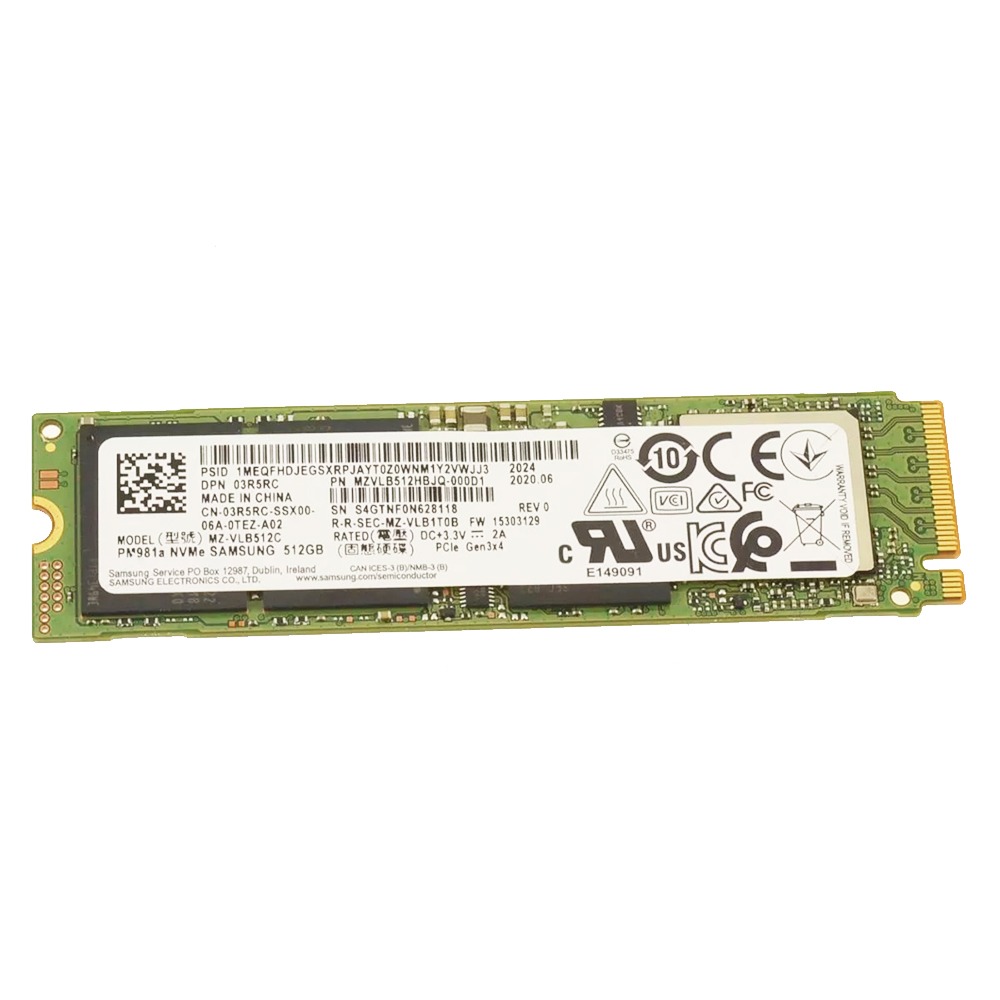
3R5RC Samsung 512GB NVMe PCIE SSD Hard Drive M.2 2280 Card For Dell Latitude 5410

3R5RC Samsung 512GB NVMe PCIE SSD Hard Drive M.2 2280 Card Replacement For Dell Latitude 5410 14″

-3% $94.00
Was: $97.00

This product is a replacement solid-state drive (SSD) specifically designed for the Dell Latitude 5410 laptop. It features a 512GB storage capacity, a PCIe 3.0 x4 interface for high-speed data transfer, and the NVMe protocol for optimized performance. The M.2 2280 form factor ensures compatibility with the laptop’s expansion slot.

SKU: DL54-HDD3R-01
Brand:
Primary Category: Dell Latitude 5410

Shipping: 5 - 9 days

6 in stock

TEKDEP Guaranteed Safe Checkout

Free USA Shipping & Worldwide Delivery

Online Exclusive: This product ships directly to your address. In-store pickup at our repair facilities is not available.

Product Specifications

General

SKU
DL54-HDD3R-01
Part Number (s)
3R5RC, 03R5RC, MZVLB512HBJQ
Brand
Samsung

Memory & Storage

Storage
512 GB
Storage Type
NVMe SSD

Additional Details

Compatibility
Dell Latitude 5410
Model: Latitude 5410, E5570, 13 (7370), E5470, E7270, E7470, 12 (7275)
Dell Alienware
Model: 15 R2, 17 R3, 13 R2, 15 R3, 17 R4, 15 R4, X51 R3, Aurora R5
Dell G Series
Model: G3 3579, G3 3779, G5 5587, G5 5590, G7 7590, G7 7790
Dell Inspiron
Model: 15 (5577), 15 (7577), 13 (7373) 2-in-1, 15 (5570), 15 (7573) 2-in-1
Dell XPS
Model: 13 (9350), XPS 15 (9550), XPS 13 (9360), XPS 15 (9560)
Dell Precision
Model: 15 (5510), 15 (7510), 17 (7710), 15 (3510), 3520, 7520
Dell Vostro
Model: 7590, 5590, 5501, 5401, 5391, 5300, 7500, 5502, 5402
Dell OptiPlex
Model: 5040, 7040, 7050, 7460, 5480 All-In-One, 7480 All-In-One
NOTE: Please verify your device's model number to ensure that this part is compatible.
Additional Features
  • Interface: PCIe Gen3 x4
  • Sequential Read Speed: Up to 3,500 MB/s
  • Sequential Write Speed: Up to 2,900 MB/s
  • NAND Type: Samsung 64-layer 3D TLC V-NAND
  • Protocol: NVMe 1.3
Includes
  • Samsung 512GB NVMe PCIE SSD Hard Drive M.2 2280 Card

Description

3R5RC Samsung 512GB NVMe PCIE SSD Hard Drive M.2 2280 Card Replacement For Dell Latitude 5410 14″

CONDITION:

  • Genuine Used – Original part removed from a device and fully tested by experienced technicians, ensuring proper functionality, compatibility, reliability, and authentic performance.


INCLUDES:

  • Samsung 512GB NVMe PCIE SSD Hard Drive M.2 2280 Card
COMPATIBILITY:

  • Alienware 15 R2, 17 R3, 13 R2, 15 R3, 17 R4, 15 R4
  • OptiPlex 5040, 7040, 7050, 7460, 5480 All-In-One, 7480 All-In-One
  • Alienware Desktop X51 R3, Aurora R5
  • G Series G3 3579, G3 3779, G5 5587, G5 5590, G7 7590, G7 7790
  • Inspiron 15 (5577), 15 (7577), 13 (7373) 2-in-1, 15 (5570), 15 (7573) 2-in-1
  • Latitude E5570, 13 (7370), E5470, E7270, E7470, 12 (7275), 5410
  • XPS 13 (9350), XPS 15 (9550), XPS 13 (9360), XPS 15 (9560)
  • Precision 15 (5510), 15 (7510), 17 (7710), 15 (3510), 3520, 7520
  • Vostro 7590, 5590, 5501, 5401, 5391, 5300, 7500, 5502, 5402

TECHNICAL SPECIFICATIONS:

  • Compatible Identifying Number: 3R5RC, 03R5RC
  • Capacity: 512GB
  • Manufacturer: Samsung
  • Manufacturer Part Number: MZVLB512HBJQ
  • Model: PM981a

ABOUT:

It’s ideal for upgrading storage performance, increasing storage capacity, and improving overall system efficiency.


VIDEO GUIDE:


Our Best 16" MacBook Price Ever

We’ve dropped prices on the MacBook Pro 2019.
Pro-level performance is now more affordable than ever.

recently viewed

Related Products

Mail-in Repair & Services

Need Help with Installation?

Worldwide, our ValetTek Mail-In Repair Service offers a smooth and efficient repair experience.

Lost Data?

TEKDEP offers top-notch data recovery to retrieve your valuable information. To Learn more about our comprehensive Data Recovery Solution.

Questions?

Contact us at Call Us (818) 456-4479, email support@tekdep.com, utilize our Live Chat feature.
Get Your repair by professional, Fast & Secure Without leaving home
Fill out the form to get started! 👉

Official TEKDEP Tutorials

Subscribe for expert tutorials, pro tech tips, and teardowns.

Configure Specs